
Maps
Design and build Maps using the visual Map Builder.
The Map Builder
The Map Builder is the visual editor for designing a Map. Use it to add stages, connect them, assign Map Roles, and decide what each stage collects or shows.
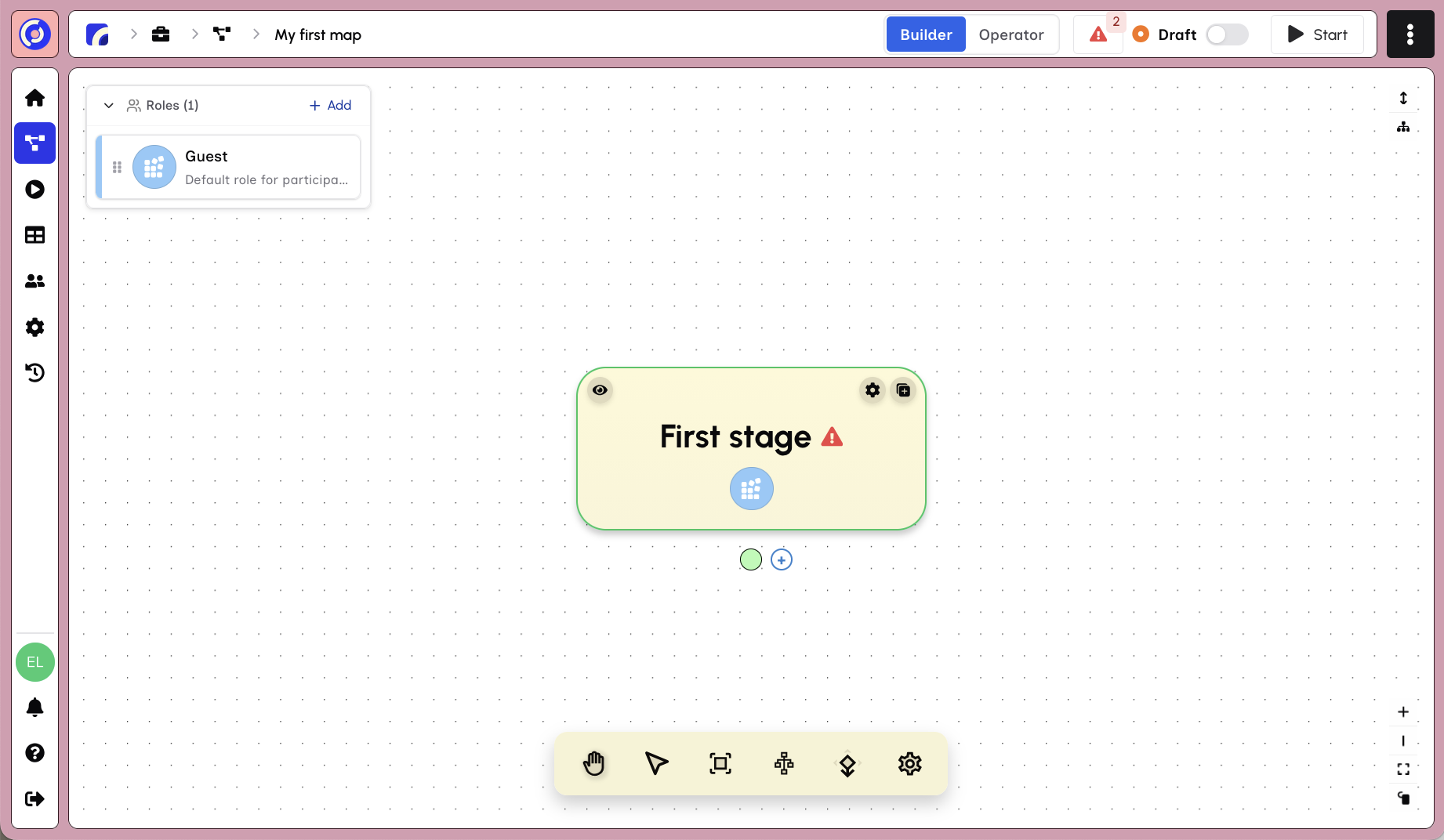
Key areas of the builder:
- Top toolbar - Switch between Builder and Operator views, toggle Draft/Published status, and start Sessions
- Roles panel (left) - Manage the Map Roles that participate in your Map
- Stage canvas (center) - Visual graph showing stages and their connections
- Canvas controls (bottom) - Pan, select, re-center, auto-layout, and settings
New Maps start with a single "First stage" assigned to a default "Guest" role. From here you can:
- Click a stage to edit its content
- Add new stages and transitions
- Define roles and assign them to stages
- Configure stage settings and validation rules
Top toolbar
The top toolbar controls the Map as a whole:
- Builder | Operator — switch between designing the Map and monitoring live Sessions
- Draft | Published — control whether the Map is available to participants
- Validation indicator — open the list of issues that prevent publishing
- Start — preview the Map, create start links or start a Session manually
The Builder and Operator show the same Map from different perspectives. Builder changes the design. Operator shows how Sessions move through it.
Roles panel
Map Roles describe the functions people perform, such as Submitter, Reviewer or Approver. Select a stage to decide which roles can see, edit or complete it. When a Session starts, real people are assigned to those roles.
See Roles for permissions, start-link assignments, and handovers.
Stage canvas
The canvas shows the Map as a connected graph. Each stage is one step. Transitions define which stage follows and can include rules that send Sessions down different paths.
Select a stage to edit its blocks and settings. Use the canvas controls to pan, re-center or arrange the graph. See Stages and Blocks & Sections for the available controls.
Validation and publishing
Eddy validates the Map before publishing. The validation indicator lists missing end stages, incomplete role assignments, and other issues that would stop a Session from running.
Resolve every validation error, then change the Map from Draft to Published. Publishing makes the current design available to participants.
Starting work
Open Start in the top toolbar:
| Option | What it does |
|---|---|
| Preview | Opens the participant experience without publishing the Map |
| Start Links | Creates links that assign people to Map Roles and let them begin a Session |
| Manual Start | Starts a Session for people you select |
If this is your first Map, follow Your First Map for the full build, validation, preview, and start-link sequence.
Tip: Once your Map is running, use the Operator view to monitor Sessions and see where work is happening.